One Customer Success Orchestrator
AI agents and your people on every customer channel, governed the way a bank needs.
OCSO is a runtime you host yourself. Named AI agents answer customers on WhatsApp, web chat, Slack and Microsoft Teams. Your team takes over any conversation and hands it back. Every change to live configuration waits for a second person’s approval, and every action lands in a signed audit trail.
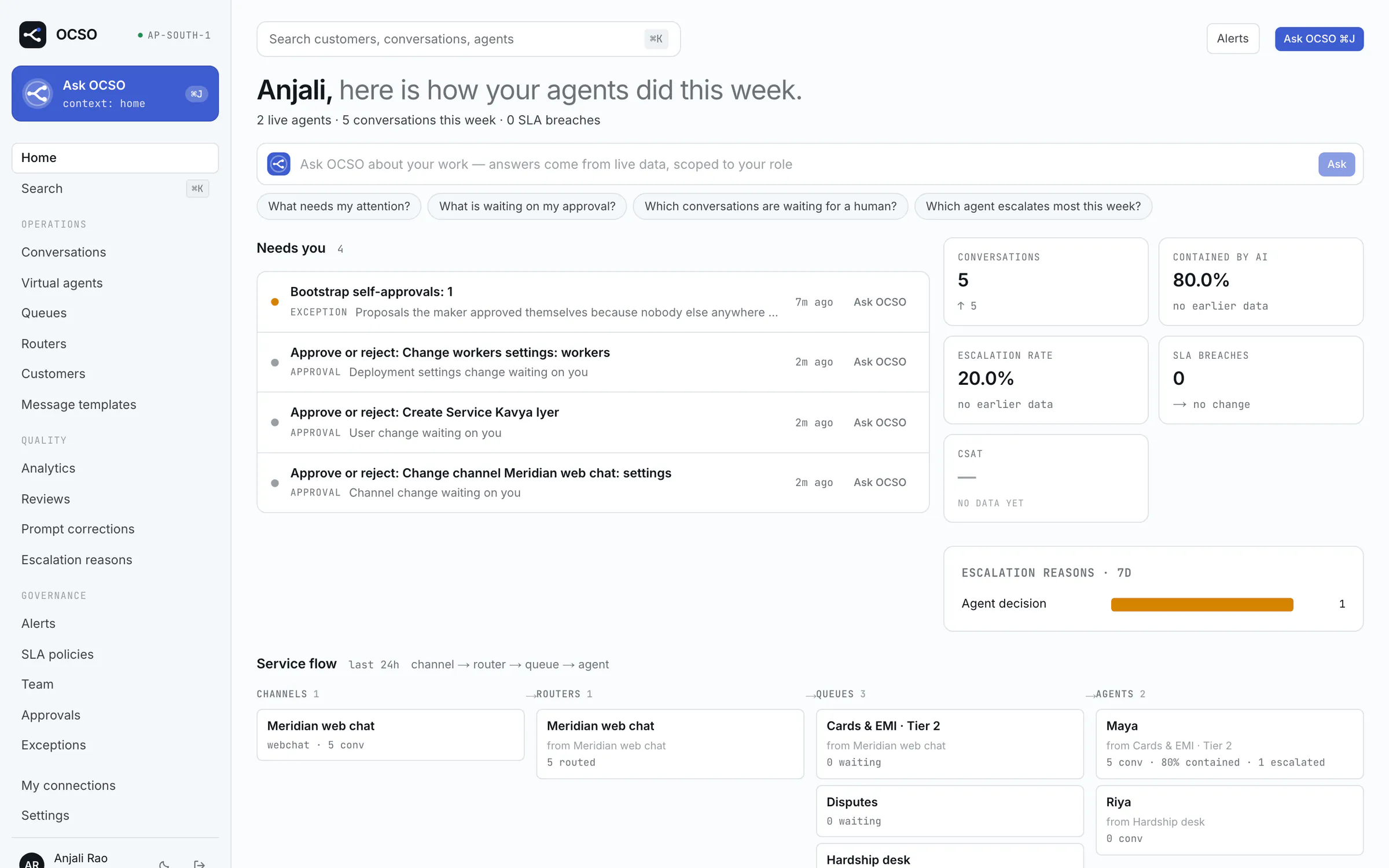
01Channels
Meet customers where they already write.
Every channel is a plugin behind one contract. The conversation model, handoff, audit and analytics are the same whichever one a customer uses.
WhatsApp
Meta Cloud API or Twilio
Connect a number directly through Meta or through Twilio. Images, voice notes, video, documents and locations arrive as typed message parts, not flattened text.
Web chat
One script tag, or your own UI
Embed the widget with one script tag, or build your own chat on the chat SDK. Customers can stay anonymous or arrive signed in with your login.
Slack
Direct messages and @mentions
People message your Slack app or @mention it in a channel. OCSO answers in the DM, or in a thread under the mention.
Microsoft Teams
Azure Bot, chats and channels
People chat with your bot one to one, or @mention it in a group chat or channel. Requests are verified against Microsoft’s signing keys.
Need another channel? Write one against the same contract. Add a channel in seven steps.
02How it works
Channel, router, queue, agent. The same path every time.
A customer never lands on an agent by accident. The route is configuration you can read, approve and audit, and the AI stays attached while a person handles the conversation.
01
Channel
- Web chat
- Slack
- Teams
The message is verified and committed to PostgreSQL before anything else happens. Queue messages are only wake-ups.
02
Router
- Menu
- Model
- Known facts
Asks a menu question, classifies with a model or uses what it already knows about the customer, then picks a queue.
03
Queue
- Cards & EMI
- Hardship
- Sales
The service unit: one AI agent, its human teams, an SLA policy, opening hours and transfer targets.
04
Agent
- Maya, AI agent
- Your team
The AI agent answers with the tools you approved. When a rule, the customer or the agent asks for a person, your team takes over.
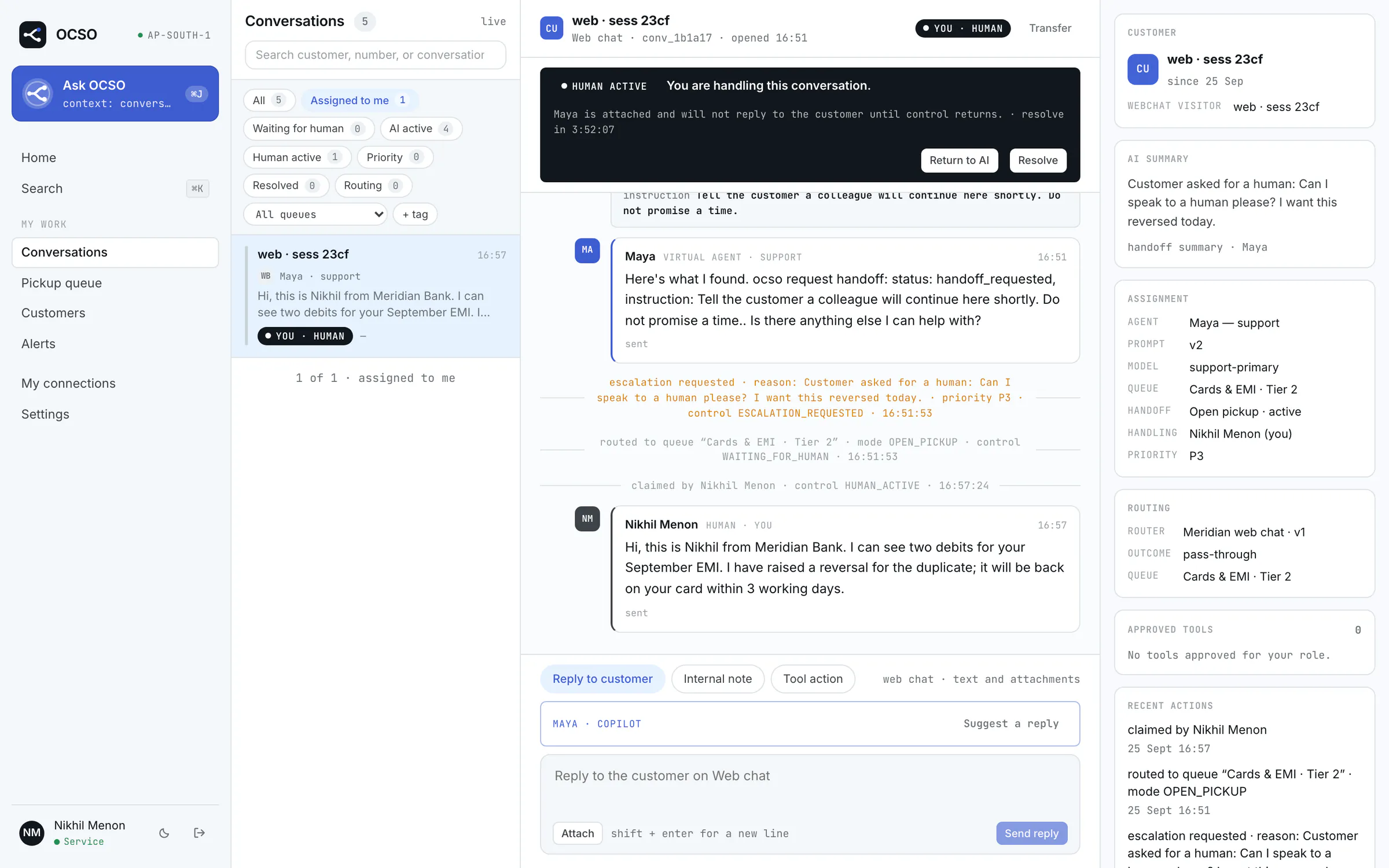
Human handoff with explicit states
Escalation rules, auto-assign or open pickup, transfers, internal notes and copilot reply drafts. Every change of control is audited, and the agent can pick the conversation up again when your colleague hands it back.
- AI active
- Escalation requested
- Waiting for a human
- Human active
- AI resuming
- Resolved
03Governance and audit
Controls an auditor can check, not just trust.
Built for regulated service teams. Permissions are checked in code, never in a prompt. Nothing a model says can grant a permission.
Four role presets
Tech
Runs the platform: providers, channels, MCP, users, settings and audit verification. Never reads conversation content.
Head
Full authority inside their teams. Checks Leads’ and other Heads’ changes, and signs the exception report.
Lead
Runs their teams’ agents, prompts, queues and routers. Proposes changes, but cannot check them.
Service
Handles the conversations in their teams’ queues, takes over from the AI and hands back.
On top of a preset, a user can get per-user grants, optionally with an expiry, and revokes. Taking access away applies at once; widening it needs approval. Heads and Leads see only the agents their teams own.
Maker–checker on every configuration change
Agents, prompts, tool grants, routers, queues, SLA policies, channels, providers, MCP connections, SSO, users and permission grants: each change is a proposal that a named second person approves. The checker approves exactly the content they saw, enforced by content hashes. Stops such as pause, disable and revoke apply at once.
A separate, tamper-evident audit store
Audit events commit in the same transaction as the change, then ship to their own database, which the application’s credentials cannot rewrite: PostgreSQL (append-only by trigger) or ClickHouse. There they are hash-chained, checkpointed with Ed25519 signatures, exported daily and verifiable offline.
A weekly signed exception report
Where the controls were bypassed or failed: configuration live without an approval, self-approvals, rights granted around approval, customers routing could not place, audit events that did not reach the store, a chain that did not verify. Signed with the audit key and scoped by team.
Verify it yourself
The audit-verify tool re-checks any range of the hash chain against the signed checkpoints, trusting only the public keys you pin. When nobody else can check a change, such as a deployment with a single Tech admin, the maker’s own approval is recorded as a bootstrap approval and shows up in the exception report.
$ docker compose run --rm migrate \
    node audit-store/dist/bin/audit-verify.js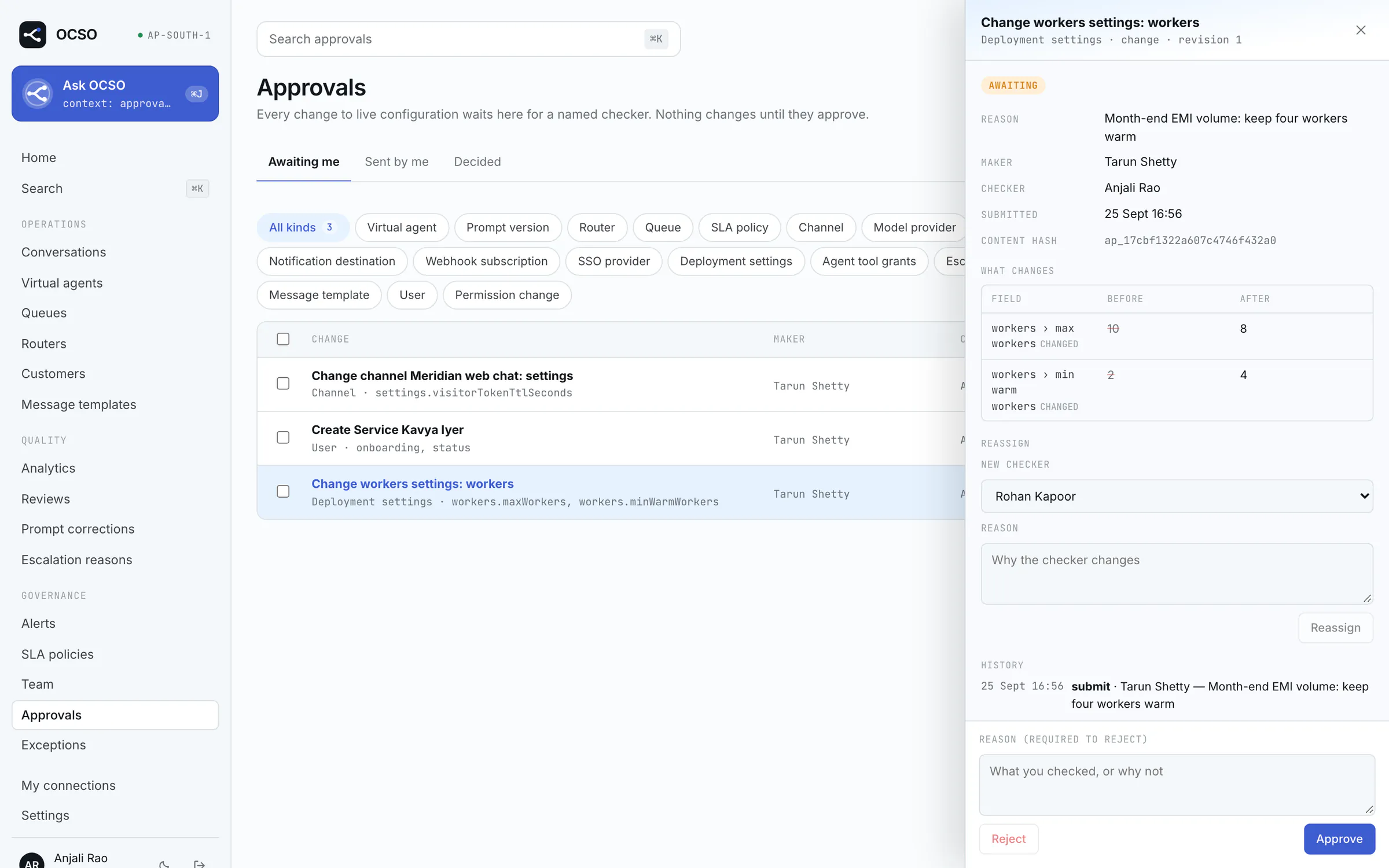
04Ask OCSO
A copilot that can do anything you are permitted to do.
Press ⌘ J or Ctrl J anywhere in OCSO. New API routes become capabilities automatically, filtered to your permissions, so the copilot grows with the product.
- What needs my attention?
- Which agent is escalating most often?
- Which MCP connection is failing?
It acts as you, never as more
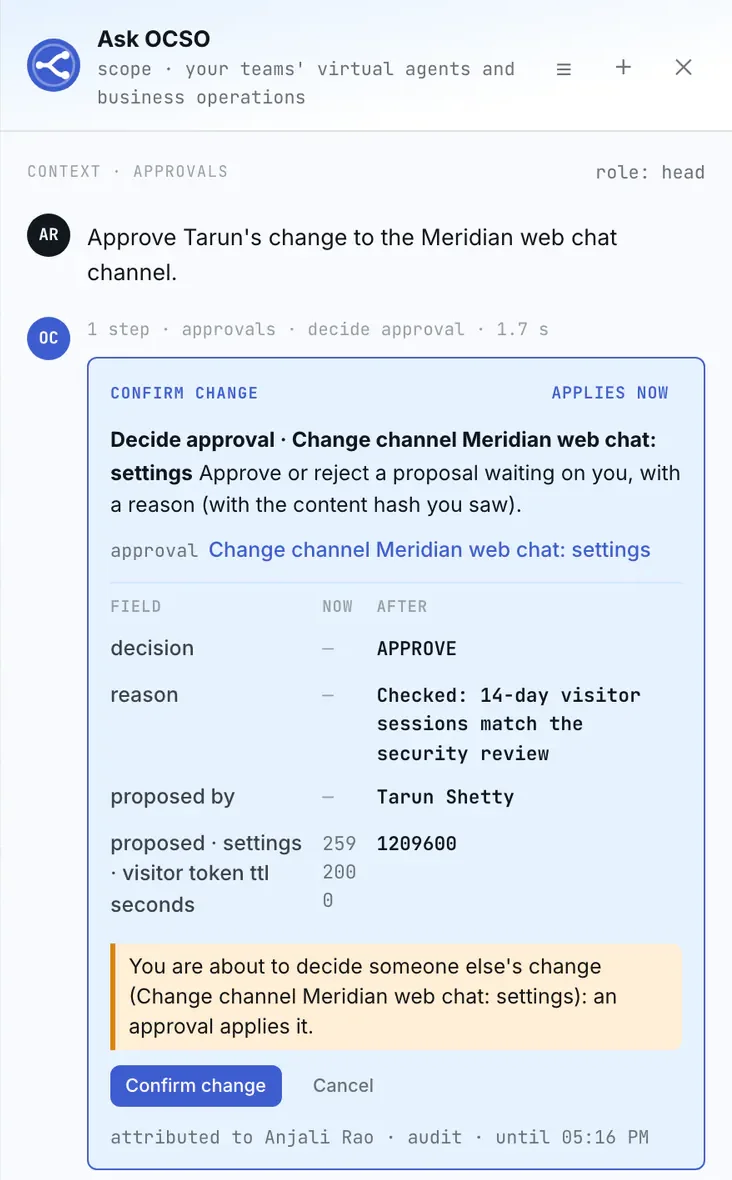
Every call goes through the real API route with a single-use delegation token for you. Guards, validation, team scope, approvals, rate limits and audit are exactly the UI’s.
Every write is a card you confirm
Reads answer straight away. A write comes back as a card built by the server, bound to the arguments and the object’s current state. It runs only when you click, once, within 15 minutes.
Governed changes go to a checker
A change that needs approval becomes a proposal with a checker and a reason. The checker can review and decide from Ask OCSO too. One governed switch turns writes off and leaves reads.
Also in Slack and Microsoft Teams
Link your chat account once and ask as yourself: same permissions, same confirmation cards, same approvals and audit as the drawer.
05Build on it
The plugin boundary is the product.
OCSO is a core plus contracts. Everything that touches an outside system is a plugin looked up by kind, and core code never names one. A lint rule fails the build if it does.
Plugin SDK
@winsendotai/ocso-plugin-sdkComing to npmThe public contracts for channels, model providers, alert destinations and email drivers, plus a checkPlugin conformance kit. The operator pins each plugin’s exact version; OCSO refuses to start on a mismatch.
Plugin SDK guideChat SDK
@winsendotai/ocso-chatComing to npmA headless client for browsers and React Native, and React hooks and themeable components on top. Anonymous visitors, session passes from your backend, or your own signed-in users.
Chat SDK guideMCP tools
Added in the app
Connect any MCP server over Streamable HTTP with OAuth 2.1. Classify each tool’s risk, approve it per agent, add argument rules and require a person to confirm sensitive actions.
Tools and MCP
import { definePlugin } from '@winsendotai/ocso-plugin-sdk';

export default definePlugin({
  apiVersion: 1,
  name: '@acme/ocso-channel-line',
  channels: [createLineAdapter],
});
Models are plugins too
Six model providers ship today: AWS Bedrock, Google Vertex AI, Microsoft Foundry, OpenAI, Anthropic and Sarvam, each with its own prompt-caching strategy. Agents use logical model profiles with ordered fallbacks, checked against a deployment policy for allowed providers and data residency.
Plugins run in-process with full trust, so install only code you trust. The SDK packages live in this repository today and are coming to npm.
06Self-host it
Your servers, your models, your data.
One deployment belongs to one organization: single-tenant, multi-user. The customer conversation, the model choice and the data stay under your control.
Docker Compose
The supported deployment: one host, four vCPU and 8 GB of RAM for a pilot. A Caddy overlay adds HTTPS with automatic certificates.
git clone https://github.com/winsenlabs/ocso.git && cd ocso
cp .env.example .env
docker compose up -d --build
Or start the demo bank, which needs no model provider keys:
OCSO_DEMO_SEED=true docker compose --profile demo up -d --buildAWS
Terraform for ECS Fargate, with drivers for S3, SQS and Secrets Manager. It is validated but not yet applied to a real account, so treat it as a starting point.
AWS guideHardened by default
- Non-root containers with read-only root filesystems, no new privileges and every capability dropped
- PostgreSQL on a network with no internet access; only the web app is published
- Bootstrap secrets generated on first start; stored credentials envelope-encrypted and kept out of logs, prompts and audit payloads
- Workers lease conversations: kill one mid-turn and another resumes it
Apache-2.0. OCSO is pre-1.0: APIs, the schema and plugin contracts can still change. Status and known gaps.
Put your AI agents and your people on one governed path.
Walk through the Meridian Bank demo, a fictional bank with live agents, queues and approvals, or clone the repository and run it on your own machine.